New drone setup is where most people lose their first weekend. The box shows up, the weather is perfect, and forty minutes later you are standing in a park with a blinking LED, a phone that will not connect, and a battery that turns out to be sitting at storage charge. I have watched that exact sequence play out at least a dozen times, including once in my own driveway with a Phantom 2 back in 2015.
Phoenix makes it worse. I fly four or five days a week in 110 degree heat, and my logbook is basically a graveyard of optimistic flight time claims. The manufacturer says 40 minutes. The desert says 24. Nothing about a new drone setup is hard, but the order you do things in matters, and skipping a step on the ground costs you ten times more in the air.
Here is the procedure I run before any airframe I own or borrow leaves the ground.
Why you should trust me
I have been flying commercially since 2015, starting with a Phantom 2 and working up through more than 20 airframes, from $300 toys to a $15,000 enterprise rig I fly for solar farm inspections. Real estate, weddings, roof surveys, agricultural mapping. I keep a logbook with battery cycle counts, gimbal behavior, and every time a drone did something I did not ask it to do.
That logbook is the reason this article exists. I have lost two batteries to Phoenix summers, watched a gimbal fail on a paid shoot because I skipped a pre-flight check, and learned that the app experience is part of the product. A drone with a buggy app is a drone that will not fly when a client is standing behind you.
I have not flown the two aircraft below. This is a setup guide, not a review, so I am giving you the procedure I use on every airframe plus the honest framing on what each of these two options is actually for.
How I built this checklist
I pulled this from patterns across my own logbook and from the mistakes I see in the commercial pilot community. Every step here has cost me money or footage at some point.
Two rules shaped the list. First, anything you can do indoors the night before, you do indoors the night before. Firmware updates, app logins, battery charging, prop checks, SD card formatting. Field time is for flying.
Second, the first flight of any new airframe is a test flight, not a shoot. It happens low, close, in an open area with nobody around, and it lasts one battery. If something is wrong with the aircraft, you want to find out at 30 feet, not 300.
I judge every drone in this category on the same things: how the camera handles mixed light, how the battery behaves after 20 cycles, whether the app connects without drama, and how the aircraft handles wind. Those are the things that decide whether you keep flying it in month six.
The two airframes worth starting with
These sit at opposite ends of the market, and that is deliberate. One is a first drone you can fly in your living room. The other is a 5 inch FPV platform for someone who already knows how to fly and wants to shoot cinematic FPV footage. Pick the one that matches where you actually are, not where you hope to be.
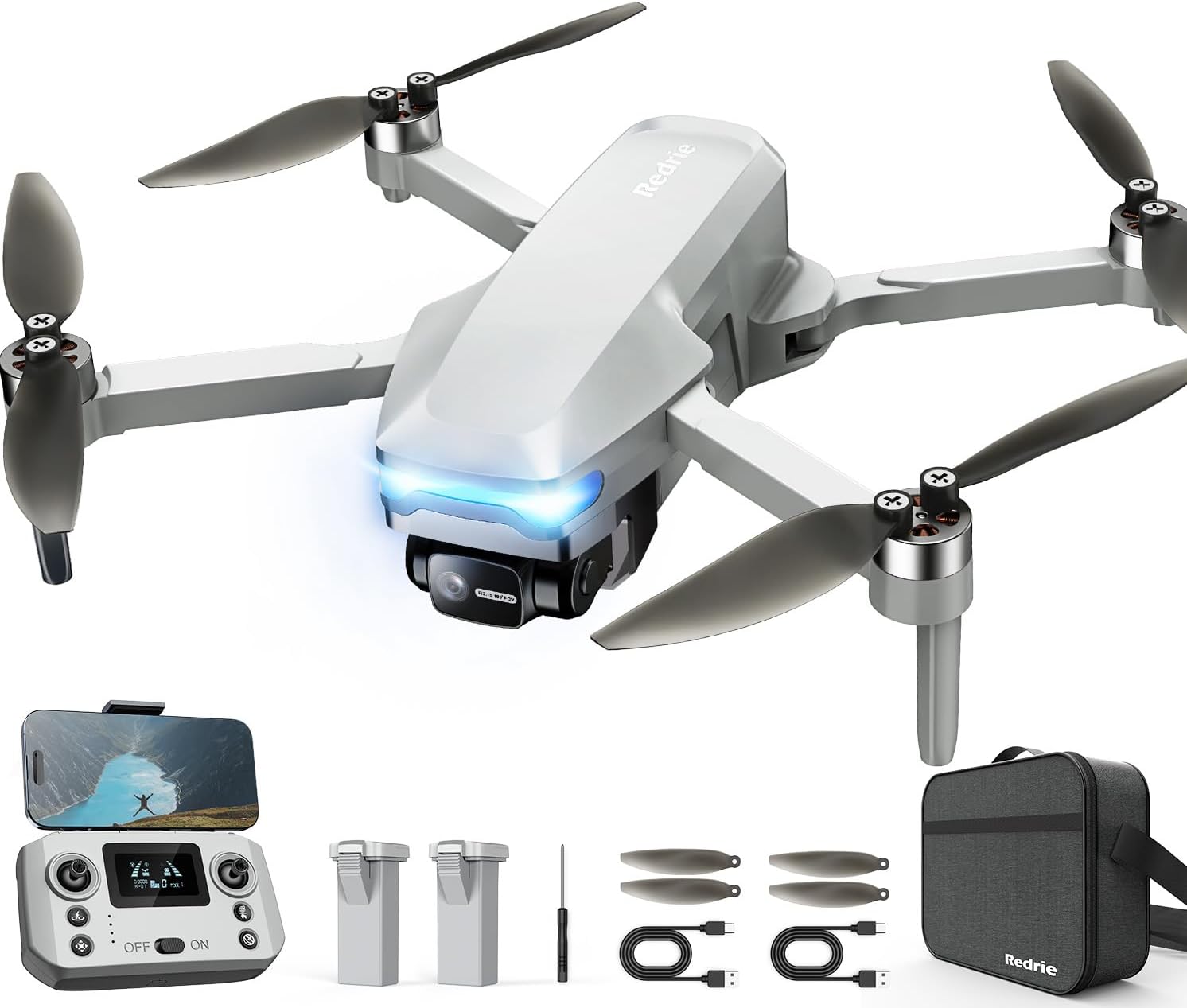
Beginner pick: Drone with 1080P Camera, Foldable Remote Control Quadcopter for Adults Beginners, Mini Drone with Stable Hover, Waypoint Fly, 3D Flips, One Key Start, 2 Batteries, Easy to Fly Indoors & Outdoors
 Visit on Amazon →
This is the drone you buy when you want to learn the controls without risking anything expensive. Foldable frame, 1080P camera, one key start, stable hover, waypoint fly, and 3D flips. The two batteries in the box matter more than any of the feature names, because a beginner burns through a pack in about 15 minutes of hovering practice and a second pack is the difference between one flight and an afternoon.
The waypoint fly mode is the interesting part for a new pilot. It teaches you that a drone can hold a position and follow a line without your thumbs, which is the mental shift from "toy" to "aircraft." One key start takes off the pressure of a manual launch.
Check current Amazon price before you commit. Verified buyers in this category consistently mention that indoor flying works best in a room with good light and no ceiling fan running, and that low light hurts any 1080P sensor.
Flaws but not dealbreakers: A 1080P camera on a small sensor will struggle at dusk and in heavy shade. Do not expect clean footage after sunset.
This is for total beginners, kids flying with supervision, and anyone who wants to practice stick control indoors during a heat wave.
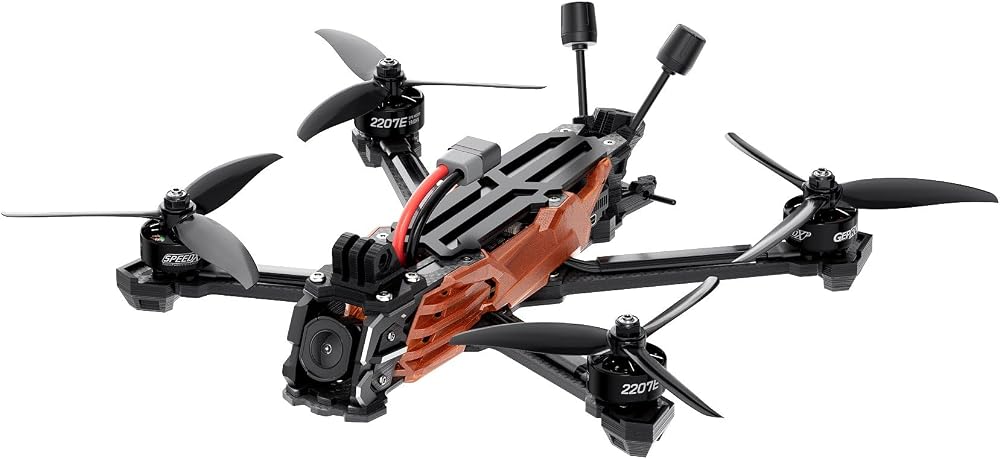
Advanced pick: GEPRC Vapor-D5 HD O4 Pro FPV Drone (ELRS 2.4G with GPS)
 Visit on Amazon →
A 5 inch FPV platform with GPS and an ELRS 2.4G radio link, and the HD O4 Pro air unit in the name tells you it is built for high definition digital video rather than analog. This is not a racing build and I would not steer a racer toward it. It is a cinematic and freestyle airframe for someone who has already put hours into a simulator or a smaller quad and wants real footage out of a real camera system.
GPS is the feature that matters most to a newer FPV pilot. It gives you position hold and a return-to-home option, which is the safety net that keeps a lost video link from turning into a lost aircraft. ELRS is a solid, well supported control link, and the community documentation around it is deep.
Check current Amazon price before you commit. Budget for spare props, a proper LiPo charger if you do not own one, and at least two extra packs. FPV packs do not last long, and one battery on a 5 inch quad is a very short session.
Flaws but not dealbreakers: This is not a first drone. FPV is flown in manual acro mode by most pilots, which means no self leveling and no forgiveness. If you have never flown a quad in angle mode, spend a month in a simulator first.
This is for the pilot who has outgrown a toy quad and wants to shoot FPV footage for real estate, events, or personal projects.
The actual setup workflow
Now the part you came for. This works on both aircraft above and on anything else you bring home.
Step one: charge everything the night before. Every pack, the controller, your phone if you are using it as a screen. A LiPo that has been sitting on a shelf is usually at storage charge, roughly 3.8 volts per cell, which is healthy for storage and useless for flying. Charge to full the night before, then let the packs rest at room temperature before you fly. Never charge a pack that is still warm from a flight, and never leave a fully charged pack sitting in a hot car.
Step two: firmware and app setup, indoors. Do this at your desk with wifi. Download the manufacturer app, create the account, and run every firmware update you can find. This is the step people skip and then regret, because firmware updates sometimes require an account, and account creation sometimes requires a cell signal you will not have at the flying field. Get it done on the couch.
Step three: registration and rules. In the United States, any drone over 250 grams has to be registered with the FAA, and recreational flyers need a TRUST certificate. Remote ID rules apply to most aircraft flown outdoors. Check the weight on your specific model, register if it applies, and put your registration number on the airframe where it is visible without tools. This is the least fun step and the one with actual legal consequences.
Step four: airframe inspection. Props on, props snug, no nicks or cracks. Gimbal guard off, and if the drone has a gimbal, check that it moves freely through its full range by hand with the power off. Format the SD card in the aircraft, not on your laptop. Check that the camera lens is clean, because a fingerprint on a lens has ruined more footage than any technical failure.
Step five: compass calibration, away from metal. Do this in an open area at least 20 feet from cars, rebar, metal benches, and your own keys and phone. If the app asks you to rotate the aircraft, do it slowly and smoothly. A bad compass calibration shows up as toilet bowl drifting, where the drone circles instead of holding position. If you see that, land and recalibrate.
Step six: set return-to-home altitude. Before takeoff, set the return-to-home height higher than the tallest obstacle within a few hundred feet. Trees, light poles, your own roof. This single setting has saved more drones than any obstacle avoidance system ever built. Obstacle avoidance is a safety net, not a pilot. I still fly like it does not exist.
Step seven: first flight, low and close. Take off, climb to about 10 feet, and hover. Watch for drift, listen for an unusual motor sound, and check that the video feed is stable. Then do slow figure eights at low altitude for the rest of the pack. You are looking for anything that feels wrong before you go anywhere interesting.
Step eight: land at 30 percent. Not 10 percent. Not when the low battery warning screams. Land at 30 percent, especially in summer, because a hot pack under load drops voltage faster than the percentage readout suggests. Treat 30 percent as empty and your packs will last far more cycles.
Heat, wind, and the flight time you actually get
Cut every flight time claim by 30 to 40 percent. That is not pessimism, that is arithmetic. The published number comes from a lab at room temperature with no wind and a fresh pack flown in a straight line. Real conditions add wind, heat, hovering, and camera work.
Heat is the battery killer. In Phoenix I have had packs swell and die at 80 percent health, and the damage happened on days when the air temperature was over 105. Store packs at storage charge, keep them out of the sun between flights, and let them cool completely before charging. If a pack looks puffy, it is done. Retire it.
Wind matters more than most new pilots expect. A light drone with a small camera gets pushed around, and the motors work harder to hold position, which eats battery faster. If the drone is fighting to stay still, you are burning flight time you did not plan for.
Cold is the other end of the same problem. Packs will not charge properly below roughly 50 degrees, so a winter session starts with warming batteries in a pocket, not on a charger.
What I left out and why
No FPV racing builds here. Racing is a different category with different hardware, different tuning, and a different skillset, and a racing guide would be useless to someone learning to fly.
No enterprise thermal or inspection rigs either. That is a professional category with its own training and its own budget, and it is not where a new pilot should start.
I also left out the $1,500 and up camera drones. The $700 to $1,200 range is the sweet spot for enthusiasts, and below that you are looking at cameras that behave like toys in mixed light. The beginner quad above is not pretending to be a cinematography tool. It is a trainer with a camera, and that is exactly what a first drone should be.
What this all costs
The beginner quad sits in the impulse purchase range, and the FPV platform is a real investment once you add packs, a charger, and spare props. Check current Amazon price on both before you decide, and do the math on the whole kit rather than the airframe alone.
Batteries are the real cost. Two packs minimum, three or four if you are serious. Add a charger if you do not own one. Add props, because you will break some. The cost per flight drops every time you fly, and the pilot who flies twice a week gets better ten times faster than the pilot who flies twice a month.
The setup itself is free. An hour on the couch the night before, a proper compass calibration, a return-to-home altitude you actually set, and a first flight that stays low and boring. That hour is the difference between a drone that works every time you take it out and a drone that sits in a closet because the last session ended badly.
Do the boring part first. Then go fly.