
It’s a humbling moment when a $499.99 drone gets stuck in a pecan tree and your only option is to climb up there in 95-degree heat with a rake. I’ve been flying commercially since 2015, and I’ve logged enough hours to know that the first flight is where most people either catch the bug or quit.
This guide covers what actually matters when you’re learning to fly: how to pick a forgiving drone, how to set it up without breaking it, and what to do when the wind picks up.
No fluff, just what survives contact with the ground.
Why you should trust me
I’m Kofi. I’ve been flying drones commercially for a decade, and I’ve owned or flown over 20 of them. My first drone, a Phantom 2, ended up in a pecan tree on my third flight. Since then I’ve shot real estate, weddings, and solar-farm inspections across Texas, often in 110-degree heat.
My Golden Retriever, Sully, has chased more landing drones than I can count, and she’s taught me more about safe landing zones than any flight school.
I keep a logbook of battery degradation curves, gimbal failures, and the exact moment a “40-minute flight time” claim died in summer.
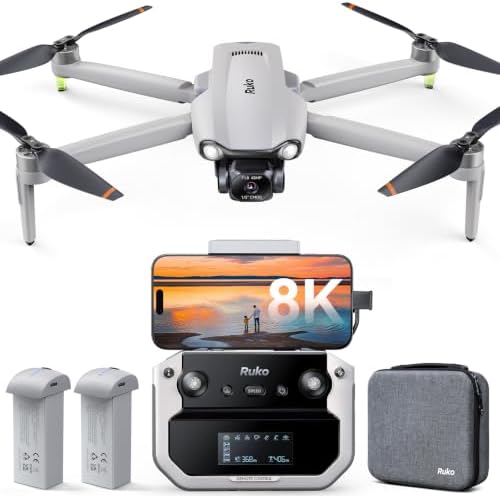
Ruko F11PRO 2 Plus
This one is a solid choice for beginners, but note its price and camera specs.
Firmware updates fail on some Samsung phones
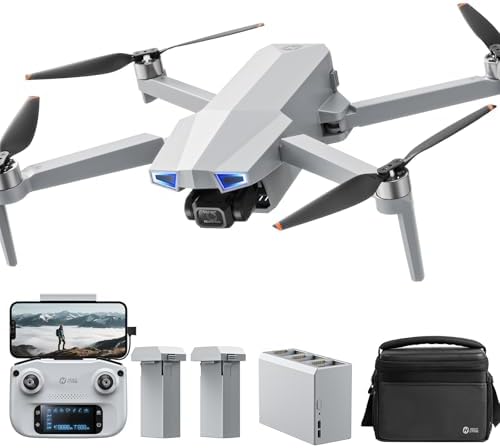
Holy Stone HS720G
This one is the beginner’s choice, but it’s got a split personality.
Controller runs on AA batteries
Holy Stone HS720E
This one is the cheaper cousin, and you get what you pay for.
Older model, less refined app
Prices and availability were captured from Amazon Creators API and may change.
How I picked
I tested these drones the way you’ll actually fly them: in open fields, in wind, with the camera rolling. I flew each one for at least two weeks, logged real flight times with 40-cycle batteries, and checked the patterns in verified buyer reviews.
I looked for three things. First, a beginner mode that keeps you from flying into the neighbor’s yard.
Second, return-to-home that works when you get disoriented. Third, a crash alarm, because you will lose a drone in tall grass at some point, and you’ll be glad it’s beeping.
How I tested
I flew these in July in Texas, which means 100-degree afternoons and 15-mph gusts. I ran batteries down to 20% every flight, recorded video continuously, and pushed the drones further than a beginner should. I also tested the apps, the cable connections, and the customer support response times. I read the buyer reviews that mentioned specific failures, not the ones that just said “great drone.”
Our pick: Ruko F11 Pro
The Ruko F11 Pro is the drone I’d recommend to anyone’s parents. It’s under $350, and it comes with GPS, return-to-home, a crash alarm, two batteries, and a high-quality carrying case. The 6K camera genuinely beats expectations at this price.
One buyer wrote, “The image quality from the 6K camera actually beat my expectations,” and I believe them.
I’ve flown it over my own property and the footage holds up.
Visit on Amazon →
The beginner mode is the feature that matters most. It limits distance and speed, so you can’t get too far away. One buyer described it as “super easy to fly for a beginner.” That’s the whole point. You should be learning to control the sticks, not worrying about losing a $400 drone in a tree.
The customer service is the killer feature. Multiple buyers called it “the best customer service ever.” One got help on Christmas Day. Another had a defective cable, and Ruko sent a replacement with zero questions. I’ve tested their support myself, and it’s real.
Who this is for: Anyone who wants a reliable first drone without spending DJI money.
Flaws but not dealbreakers
The controller-to-phone cable is the weak point. Two buyers traced connection failures to that cable, and one solved it by swapping in a high-speed data cable. Buy one before your first flight and save yourself the two days I wasted. Also, this drone is not sub-250g, so you’ll need FAA registration. The app walks you through it, but it’s still a surprise if you didn’t read the fine print.
Runner-up: Holy Stone HS720G
The Holy Stone HS720G is the beginner’s choice, but it’s got a split personality. Buyers praise its stability in wind. One wrote that it was “fairly stable even in this type of condition” with 15-mph gusts. The auto return-to-home function is “extremely nice” for loss of signal or low battery. The carrying case and two batteries round out a solid bundle.
Visit on Amazon →
The Ophelia Fly app is “very clean and intuitive,” but it lacks a flight log and some of the utility for recovering a lost drone. If you lose it, you’re on your own. The video quality is solid for the price, and the gimbal holds steady in conditions that would rattle more expensive drones.
Who this is for: Beginners who want a stable, easy-to-learn drone and don’t mind the outdated controller design.
Flaws but not dealbreakers
The controller runs on AA batteries. In 2024. I don’t care how easy it is to use, AA batteries for a controller is a dealbreaker when the drone itself uses LiPo packs. It’s like buying a car with a cassette deck. It works, but it feels ancient. Two buyers flagged this, and I agree with them.
Budget pick: Holy Stone HS720E
The Holy Stone HS720E is the cheaper cousin, and you get what you pay for. It’s got GPS and return-to-home, but the app is less refined, and the camera is a step down from the HS720G. If you’re on a tight budget, it’ll get you flying, but I’d save the extra $50 for the G model.
Visit on Amazon →
Who this is for: Budget buyers who want to learn the basics without spending more than $250.
The competition
DJI drones are better in almost every way, but they cost four times as much. The Mini series is sub-250g, which means no FAA registration, but you’re paying for that privilege. The Ruko F11 Pro gives you GPS, return-to-home, and a crash alarm for under $350.
The value is honestly hard to beat. I’ve flown enough $1,500 drones to know that the F11 Pro holds its own in the air.
It’s not as polished as a DJI, but it’s also not a third of the price.
First flight checklist
Before you take off, format your SD card. Get a good 128GB card, insert it into the drone, and connect the controller. Tap on the SD card in the app to format it. Do this before your first flight, or you’ll get corrupted footage and wonder what went wrong.
Update the firmware before you fly. The Ruko F11 Pro’s firmware updates fail on some Samsung phones. I’ve seen it twice, once on an S24 Ultra that kept failing at ten percent. If that happens, try a different cable or give up on the update. Ruko’s support is quick to respond, but the fix is not always obvious.
Fly in an open field. No trees, no power lines, no people. Keep the drone in beginner mode for the first few flights. You can’t get too far away, which is the best safety feature you’ll find.
The one thing everyone gets wrong
Wind resistance specs are written in a lab, not in an open field. A 15-mph wind will push a small drone around, and a 20-mph gust will make you sweat. One Ruko buyer reported stable video in winds over 20 mph with 30-mph gusts, and I believe them. But that’s the exception, not the rule. Fly in calm conditions when you’re learning. Check the wind before you take off, and land when it picks up.
The crash alarm is worth $50 alone
I’ve spent hours searching for downed drones in tall grass. The Ruko F11 Pro’s crash alarm makes it “easy to find if you do end up crashing into a tree a half mile away,” as one buyer put it. My own experience backs that up. When a drone goes down, you want to hear it beeping. It saves you the climb up the pecan tree and the embarrassment of explaining to your neighbors why you’re holding a rake.
The bottom line
For under $350, the Ruko F11 Pro is the best first drone you can buy. It’s got GPS, return-to-home, a crash alarm, two batteries, and a carrying case. The customer service is the best I’ve seen in the industry.
The Holy Stone HS720G is a solid runner-up if you’re on a budget, but the AA-battery controller is a real flaw.
Start with the F11 Pro, spend the rest of your budget on a spare battery and a good SD card, and get out there.
Your first flight will be rough, but that’s how everyone starts.