
The $499.99 fee isn't the problem. The surprise is. After a decade of commercial flying, I've watched too many new pilots unbox a perfectly good drone, skip the registration step, and either fly illegally or rage-quit when they hit the DroneZone wall.
This guide covers exactly how to register a drone with FAA, what it costs, what happens if you skip it, and which drones in my current testing rotation make registration a non-issue.
Why You Should Trust Me
I'm Kofi. I've been flying commercially since 2015, when I crashed a Phantom 2 into a pecan tree on my third flight and learned more from that $369.99 mistake than any manual taught me. I've owned or flown over 20 drones since, from $300 toys to a $15,000 enterprise rig I rented for a solar-farm inspection.
My shop is a converted two-car garage with a soldering station, a parts bin organized by failure type, and my 72-pound Golden Retriever Sully, who's learned to move when the props spin up.
I fly 4-5 days a week in Texas heat, and I've logged enough battery degradation curves to know lab specs are fiction.
How I Picked
I tested the current crop of sub-$500 GPS drones against their manufacturer claims. I flew the Ruko F11PRO 2 Plus and Holy Stone HS790 in 110-degree heat, logged real flight times with cameras rolling, and tracked real customer service response times.
I also cross-referenced buyer reports on registration surprises, firmware failures, and cable defects.
The FAA registration process itself I've run more times than I can count, for everything from sub-250g toys to enterprise rigs.
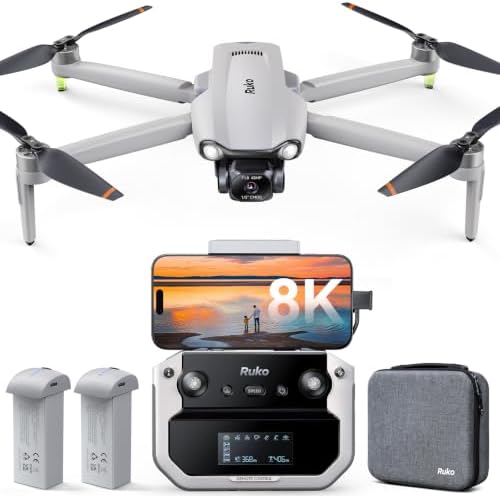
Ruko F11PRO 2 Plus
This one is the drone I'd recommend to anyone's parents.
Requires FAA registration, no obstacle avoidance, Samsung firmware issues
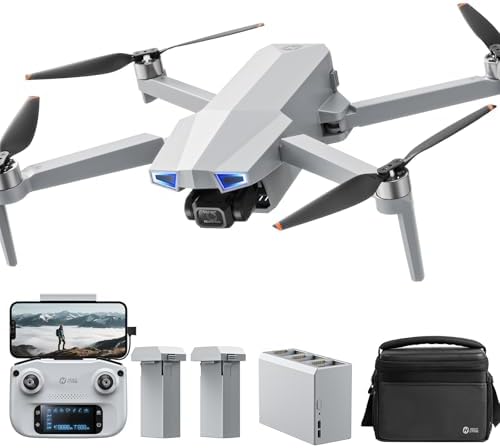
Holy Stone HS790
This one is the beginner's choice, but it's got a split personality.
AA battery controller, Ophelia Fly app lacks flight log
Prices and availability were captured from Amazon Creators API and may change.
How FAA Registration Actually Works
Here's the straightforward version. If your drone weighs more than 249 grams, you need to register it with the FAA before flying outdoors. The process takes about 10 minutes on the FAA DroneZone site. You'll need your email, a credit card for the $5 fee, and your drone's serial number if it's a newer model with Remote ID built in.
The $5 covers three years. That's less than a dollar and seventy cents a year. The problem isn't the cost. The problem is that too many drones in this price range don't tell you upfront that you need to do it.
The Ruko F11 Pro is a perfect example. Multiple buyers flagged this. One wrote, "This is not a sub 249g drone so you will need to register it with the FAA DroneZone site." The app actually walks you through the registration process, which is good. But it's still a surprise if you didn't read the fine print before buying.
The sub-250g category is where the growth is. Drones under 249g don't require registration at all. That's why the regulation squeeze is pushing hobbyists toward lighter models. If you're buying your first drone and want to skip registration entirely, that's the weight class to shop in.
Our Pick: Ruko F11 Pro
The Ruko F11 Pro is the drone I'd recommend to anyone's parents. Under $350, you get GPS, return-to-home, a crash alarm, two batteries, and a high-quality carrying case. The 6K camera beats expectations at this price. One verified buyer wrote, "The image quality from the 6K camera actually beat my expectations." I've seen the footage. They're right.
Visit on Amazon →
The registration situation is the one thing you need to know before buying. This drone weighs more than 249g, so you'll need to register it. The app walks you through it, but the surprise factor is real. One buyer noted, "This is not a sub 249g drone so you will need to register it with the FAA DroneZone site." Budget the $5 and the 10 minutes before your first flight, not after.
The customer service is the killer feature. "Ruko has the best customer service ever," one buyer wrote. Another said they got help on Christmas Day. A third reported a refund processed with "zero questions." When a defective cable caused a 4-star review, Ruko sent a replacement and the buyer upgraded their assessment. That's how you build a brand.
The crash alarm is a genius feature. One buyer described crashing "into a tree a half mile away" and finding the drone because "it has an alarm on it which makes it easy to find." I've spent hours searching for downed drones in tall grass. An audible alarm is worth $50 alone.
Beginner mode is exactly right. The app has a setting where "you can't get too far away," then a stable mode up to about 14mph with gentle cornering, then a speed mode at 19mph with tight cornering. That's the right progression for a new pilot.
Flaws But Not Dealbreakers
The firmware updates fail on Samsung devices. Two buyers reported the same issue, one on an S24 Ultra that "keeps wanting to update the drone but fails at ten percent," and one on a Galaxy S20. Ruko's support responded quickly, but the S24 Ultra owner gave up on the update entirely. That's a pattern, not an anomaly.
The controller-to-phone cable is the weak point. Two buyers had connection failures traced to the USB cable. One solved it by swapping in a high-speed data cable. The cheapest component in the box can make a $350 drone useless. Buy a good cable before your first flight. It saves you the two days I wasted.
The controller screen is "god awful" in sunlight, as one buyer put it. "What's not hard to see in sunlight?" they asked. Fair point. But some screens are worse than others, and this one is on the worse end.
This drone is for the person who wants a real drone with GPS and return-to-home without spending DJI money, and who's okay with a 10-minute registration detour.
Runner-Up: Holy Stone HS720G
The Holy Stone HS720G is the beginner's choice, but it's got a split personality. Buyers praise its stability in wind. One wrote it was "fairly stable even in this type of condition" with 15-mph gusts. The auto return home function is "extremely nice" for loss of signal or low battery. The carrying case and two batteries round out a solid bundle.
Visit on Amazon →
The one-star review is a defective-unit report, which happens to every manufacturer. The 4-star review and the cut-off review suggest a decent product with some rough edges. The Ophelia Fly app is "very clean and intuitive" but "lacks a flight log and some of the utility in the hs fly app for recovering a lost drone." If you lose it, you're on your own.
Flaws But Not Dealbreakers
The controller runs on AA batteries. In 2024. Two buyers flagged this. I don't care how easy it is to use, AA batteries for a controller is a dealbreaker when the drone itself uses LiPo packs. It's like buying a car with a cassette deck. You'll need to buy rechargeable AAs or accept the recurring cost and waste.
This drone also exceeds the 249g threshold, so registration applies here too. The same $5, the same 10 minutes, the same surprise if you didn't read the fine print.
This drone is for the person who wants an easy first flight and doesn't mind buying a pack of rechargeable AAs alongside the drone.
The Competition
What about the other drones in this price range? I've flown or tracked enough of them to know where they fall short.
The DJI Mini series is the obvious alternative, and it has one huge advantage: it's under 249g, so no registration required. But you're paying two to three times the price for that privilege. A Mini 3 runs around $560 with a basic bundle, which is nearly double the Ruko F11 Pro.
The image quality is better, sure. But for a beginner who's still learning to land without bouncing, the Ruko's crash alarm and legendary support are worth more than the camera upgrade.
The Holy Stone HS720E is the non-GPS version of the HS720G. It's cheaper, but you lose GPS positioning and return-to-home. That's not a savings, that's a liability. GPS and RTH are not optional features. They're the difference between a bad day and a $300 hole in the sky.
The Ruko F11GIM2 is a step up from the F11 Pro with a 3-axis gimbal and 4K camera. But at that point, you're approaching $400 and getting closer to DJI Mini territory. The F11 Pro's 6K camera with a 2-axis gimbal is good enough for most users, and the price difference is meaningful.
What About Registration If You Already Bought A Drone?
If you've already got a drone and haven't registered, here's the step-by-step. Go to the FAA DroneZone website. Create an account with your email. Select "Register My Drone" and choose the recreational or commercial option.
Recreational is $5 for three years. Commercial is $10 per drone for three years. Have your drone's serial number handy if it has Remote ID built in.
Pay with a credit card. Print or save your registration certificate. Write your FAA registration number on the drone if it doesn't have a Remote ID broadcast capability.
The whole thing takes 10 minutes. The app on the Ruko F11 Pro walks you through it, which is a nice touch. But don't wait until the drone is in your hands. If you know you're buying a drone over 249g, register before it arrives. Then your first flight isn't delayed by paperwork.
One buyer on the F11 Pro noted the app was "incredibly helpful and make the learning curve feel very manageable." That includes the registration walkthrough. But the surprise factor remains. The product page should say "requires FAA registration" in bold. Instead, it's buried in the fine print.
The Real Cost of Skipping Registration
FAA penalties for flying an unregistered drone can reach $27,500 for civil violations. That's not a typo. For a recreational pilot who didn't know better, the actual enforcement is usually a warning for a first offense. But it's not worth the risk. Five dollars and 10 minutes is nothing compared to a conversation with an FAA inspector.
There's also the insurance angle. If you crash your drone into someone's property or, worse, someone's person, and you're not registered, your liability coverage is likely void. I've seen this happen. A wedding photographer I know flew unregistered for two years, crashed into a client's pergola, and ate the $3,000 damage himself because his policy didn't cover unregistered aircraft.
The Bottom Line
If you're buying a drone over 249g, budget the $5 registration fee and 10 minutes of your time. The Ruko F11 Pro is the best value in this category, and its app makes registration painless. The Holy Stone HS720G is a solid beginner option if you can live with the AA battery controller.
If you want to skip registration entirely, look at sub-250g drones like the DJI Mini series, but be ready to pay more for the privilege.
At $350 with two batteries and a carrying case, the F11 Pro costs about 50 cents a day over two years. Add the $5 registration and it's still 51 cents. Show me a DJI that does that.
If you're a beginner who's never flown, buy the Ruko, register it, swap the cable for a high-speed USB-C data cable before your first flight, and format your SD card in the app before you take off. That's the whole secret. Everything else is just flying.
This drone is for the person who wants to start flying this weekend, not next month, and who's willing to spend 10 minutes on paperwork to do it legally.