Most FPV pilots do not quit after a crash. They quit after they price a whole new kit. That is the mistake. An FPV drone replacement is almost always cheaper than starting over, and the whole decision comes down to one question: did your goggles and your controller survive?
I fly commercially out of Phoenix, mostly real estate, weddings, and solar inspections, and I fly FPV on the side for the shots that need movement. I have put quads into gravel, into a palo verde, and once into a retention pond. The pattern is always the same. The pilot assumes everything is dead. Usually the goggles, the radio, the charger, and most of the batteries are fine. Only the aircraft is gone.
This is the how-to for that situation. It is not a build guide and it is not a racing article, because racing is a different category with a different skillset. This is the boring, practical version: figure out what you lost, buy the right thing, get it linked, and get it back in the air.
Why you should trust me
I have been flying since 2015, when a Phantom 2 was the whole world, and I have owned or flown more than 20 aircraft since, from cheap toys to a $15,000 enterprise rig. I fly four or five days a week in a city where summer ramp temperatures hit 110 degrees, which means I have watched more batteries swell and die than most people will ever charge.
That matters here because crash recovery is a hardware problem and a software problem at the same time. The hardware question is whether the airframe is worth fixing. The software question is whether the replacement will talk to the goggles and the radio you already own. Get the second one wrong and you have bought a paperweight.
I also have no interest in selling you a kit you do not need. If your goggles work, an airframe is the answer. If you never owned a set of goggles, the math flips completely.
How I picked these two paths
There are two ways back into the air, and they are not competitors. They are for two different pilots.
The first path is the airframe-only replacement. You keep the goggles, the controller, the charger, and the batteries, and you buy only the flying part. It is the cheapest route by a wide margin, and it is what I recommend to anyone who already has a working FPV setup.
The second path is a ready-to-fly kit. That is for the pilot who lost everything in one go, or who never had a full setup and borrowed their way into FPV. A kit with goggles and batteries bundled in is the shortest distance from zero to flying.
Four criteria decided which products I would point at.
Batteries. My rule is simple. Buy the setup with extra batteries or do not buy it at all. One battery is a twelve-minute session, and the drive to the field costs more than the flight. Three packs is the floor for a real outing.
Compatibility. Goggles and radios are ecosystems. If a replacement airframe will not bind to the gear you own, it is not a replacement. It is a new hobby.
What is actually included. "Aircraft only" is a warning label as much as a description. Some airframes ship with the camera and gimbal, some do not. Read the listing twice.
The app and firmware path. A drone with a buggy update process is a drone that will not fly on the morning you need it. This is where the big brands still win, and it is the main reason I keep pointing people at the same ecosystem.
What you need before you start
Do not order anything until you have laid every surviving piece of your setup on a table and confirmed what still powers on. A replacement airframe is the right call most of the time. A full kit is the right call when the answer to "do my goggles still work?" is no.
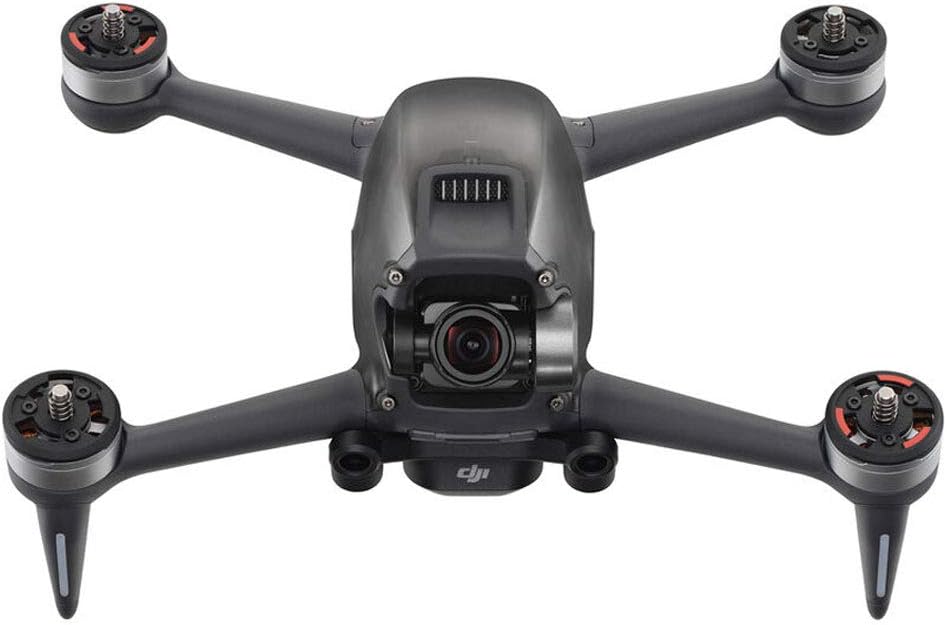
Our pick: DJI FPV Drone Replacement Aircraft only(Includes Gimbal Camera) for Crash or Lost - NEW
 Visit on Amazon →
This is the replacement aircraft for the DJI FPV system, and it is the part that actually breaks. It includes the gimbal camera, which matters, because the gimbal is the first thing to die in a hard impact and the most expensive single component to buy on its own. If you already own DJI FPV goggles and the controller, this gets you flying again without rebuying the parts that survived.
Check current Amazon price. Compare it to the cost of a complete new kit and the case for the airframe-only route makes itself.
Flaws but not dealbreakers: An aircraft-only listing means no battery, no charger, no goggles, and no props beyond whatever is in the box. Budget for those separately. Also confirm your existing packs are healthy before you bolt them onto a fresh airframe, because a swollen battery will damage a new aircraft just as happily as an old one.
If you crashed a DJI FPV and your goggles and radio still charge, this is the block to buy.
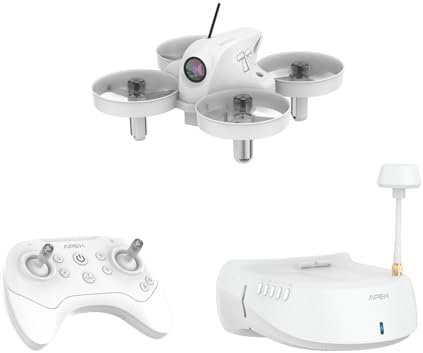
If you are starting from zero: APEX FPV Drone Kit with 120° Wide FPV Goggles,3 Batteries RTF Drone (White)
 Visit on Amazon →
This is the other path. It is a ready-to-fly kit with goggles in the box and three batteries included, which is exactly the configuration I tell new pilots to look for. Three packs means a real session instead of a twelve-minute tease, and the bundled goggles mean you are not hunting a separate ecosystem on day one.
Check current Amazon price. The kit price is the whole entry cost, which is the point of a kit.
Flaws but not dealbreakers: These goggles are matched to this drone, not to the DJI system, so do not buy it expecting to fly a DJI airframe with them or the other way around. The camera is a wide-angle FPV camera built for flying, not a stabilized gimbal camera built for cinema. Buy it to fly and to learn, not to shoot a client's listing.
If your crash took everything, or you are buying your first FPV setup, start here.
The actual recovery workflow
Now the part that decides whether you fly this weekend or next month.
Step one: Diagnose before you shop. Lay the wreckage out. Check the arms for cracks at the motor mounts, not just the visible frame. Spin each motor by hand and feel for grit or a grind. Look at the camera and gimbal: if the gimbal twitches or hangs limp on power-up, that is a camera problem, and it changes which listing you need. Then power on the goggles and the radio separately.
Step two: Decide airframe versus kit. If the goggles and radio power on and bind, buy the airframe. If either one is dead, price the kit. Do not buy a new airframe to pair with dying goggles, and do not buy a whole kit to replace one cracked arm.
Step three: Inventory the batteries. Count your packs and check each one. A swollen pack is a fire risk, not a spare. If you are down to one healthy battery, add packs to the order, because a new airframe with one battery is a hangar queen.
Step four: Confirm the ecosystem before you pay. The replacement aircraft has to bind to the goggles and controller you own. The bundled kit has to come with the goggles it is matched to. This is the step people skip, and it is the step that produces the angry forum post.
Step five: Register and label. In the United States, anything flown under the recreational or commercial rules that weighs more than 250 grams needs registration, and the number goes on the outside of the aircraft, not inside a battery bay. Label the new airframe before its first flight, not after.
Step six: Link, then update. Bind the aircraft to the goggles and the controller first, then run firmware updates on everything, goggles included. Update in the order the app asks for. If you update the aircraft but not the goggles, you get link failures that look like hardware faults.
Step seven: Set the failsafe and the return-to-home altitude. Set the RTH height above the tallest thing you regularly fly near, not the tallest thing in your yard. Set the failsafe behavior before the first flight, not after the first flyaway.
Step eight: Hover test, then fly. The first pack is a hover at eye level in an open field. Watch for drift, listen for a bad motor, and land early. The second pack you can actually fly. Do not take a brand-new airframe straight to a client shoot.
Step nine: Log it. Write the date, the aircraft, and the battery cycles in a notebook or a spreadsheet. When one pack starts dropping faster than its neighbors, you want the history to prove it.
Where this goes wrong
The goggle mismatch. This is the most expensive mistake in FPV. Goggles and airframes are paired by protocol, and the pairing is not obvious from product photos. Confirm the system in the listing before you buy.
The "aircraft only" surprise. No battery, no charger, sometimes no props. Add those to the cart in the same order or you will be waiting a week for a second shipment.
Batteries that sat in a hot garage. Heat is the battery killer. Two of my packs swelled and died at 80 percent reported health during Phoenix summers. If your surviving batteries spent the summer in a hot car, treat them as suspect and watch the first few flights closely.
Firmware that locks you out. If the app will not complete a link because one component is behind on a version, update everything before you troubleshoot hardware. Half the "my new airframe will not bind" cases I hear about are version mismatches.
Assuming a warranty covers a crash. Crash damage is usually on you. Read the coverage terms before you plan around a free repair, and do not build a budget on a claim that gets denied.
The other options, and why they are usually worse
Buying a whole new kit when your goggles are fine is the most common way to waste money in this hobby. You pay again for goggles and a radio you already own.
Repairing the old airframe makes sense for a cracked arm on a frame you can still buy parts for. It stops making sense once the damage reaches the gimbal or the flight controller, because at that point the parts bill approaches the price of a replacement aircraft with a camera already attached.
Buying used is a gamble on someone else's crash history. Unless you can inspect the motors and the gimbal in person, you are buying a mystery.
Stepping down to a sub-250 gram drone is a different decision entirely. That is about regulation and where you are allowed to fly, not about replacing what you lost.
What this actually costs
I am not going to quote you a number, because prices move and I would rather you look at the live listing than at a figure I typed months ago. Check current Amazon price on both options above and compare them directly.
The math you should actually run is cost per flying session, not sticker price. A kit with three batteries gives you three flights per outing. An airframe-only replacement paired with the batteries you already own gives you the same three flights for less money, provided those packs are healthy. An airframe paired with one dying battery gives you one flight and a fire risk.
Divide the total by the number of sessions you expect this year. Then add the accessories that always get forgotten: spare props, an ND filter set if you shoot video, and a charger that can bring multiple packs up at once. That last one changes how often you fly more than any other purchase in this hobby.
Get it in the air
A crash is a bad afternoon, not the end of the hobby. The recovery is mechanical: find out what survived, buy the piece you actually need, link it properly, and test it in an open field before you trust it near anything expensive.
If your goggles and radio came through, the airframe-only route is the answer, and you will be flying again faster than you expect. If everything went down with the aircraft, a ready-to-fly kit with three batteries is the honest way back in. Either way, the drone you lost is replaceable. The season you spend sulking about it is not.