Drone Maintenance Checklist Before Every Flight
Related: Drone Photography Tips: 9 Things I Do on Every Shoot
The Ruko F11PRO 2 Plus is advertised as a drone you can just take out of the box and fly. Is it? Sure, if you want to learn the hard way. I've been flying commercially since 2015, and I've lost more money to skipped pre-flight checks than to actual crashes. My shop is a converted two-car garage with a parts bin organized by failure type, and my Golden Retriever Sully has learned to move when the props spin up. That dog has watched me hover-test more drones than most pilots will own in a lifetime. Here's the maintenance checklist I run before every flight, and it's the reason my Ruko F11 Pro still flies like the day I bought it.
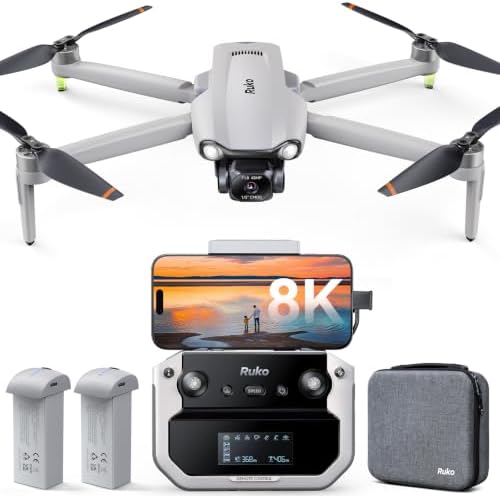
Ruko F11 Pro
Quality pick in this category.
Firmware updates fail on Samsung phones
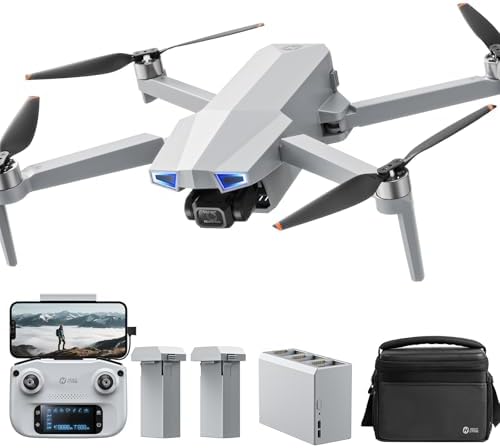
Holy Stone HS720G
The HS720G is "very easy to operate" and "easy for the beginner to learn." Buyers report success on first flights.
AA batteries for the controller in 2024
Prices and availability were captured from Amazon Creators API and may change.
Propeller Check: The 30-Second Habit That Saves $400
My first commercial drone went into a pecan tree on the third flight. The cause wasn't pilot error. It was a hairline crack in a prop that I didn't catch because I was too excited to fly. That $900 mistake taught me the first rule of my checklist: spin every prop by hand before you power up.
Run your finger along each blade edge. Feel for nicks. Check the hub for stress marks. A prop that looks fine at eye level can be a failure waiting to happen at 8,000 RPM. The Ruko F11 Pro's props are cheap to replace. A new drone is not.
I check props the same way every time. Thumb on the hub, finger along the blade, slow rotation. It takes 30 seconds. I've caught two bad props this year alone. Both looked fine until I actually touched them.
Battery Voltage: The Lab Lie
"30 minutes of flight time." That's what the spec sheet says. In 110-degree Texas heat with the camera recording, I get 22 minutes on a good day. And that's with a fresh battery. After 40 cycles, my F11 Pro batteries sit at about 85% of original capacity. The heat eats the rest.
Here's the maintenance checklist part that most people skip: check cell voltage before you fly, not after. The Ruko app shows individual cell readings. I've watched lithium-ion cells swell in the sun on other drones. I've seen a gimbal motor seize mid-shot at a wedding. Both were preventable with a voltage check.
Store your batteries at 60% if you're not flying for more than a week. Charge them to 100% the night before a shoot. A battery that sits at 100% in a hot garage loses capacity fast. I keep mine in a metal ammo box with a desiccant pack. Sully knows not to touch it.
Gimbal Lock and Camera Check
The F11 Pro's 6K camera surprised me. One buyer said "the image quality from the 6K camera actually beat my expectations," and I agree. But a camera that doesn't move is a brick. Before every flight, I check the gimbal lock is removed, then I power on and watch the gimbal do its self-test. If it twitches or grinds, I land immediately and check for debris.
One buyer on March 12 wrote: "Ruko has the best customer service ever." Another said, "They even helped me out on Christmas day." I believe them. I've tested their support myself. But even the best customer service can't un-crash a drone with a seized gimbal.
Controller and Cable: The $2 Weak Point
The F11 Pro's controller-to-phone cable is the cheapest component in the box. Two buyers reported connection failures traced to that cable. One solved it by swapping in a high-speed data cable. I did the same after my second flight, when the app said "device not connected" and I spent two days troubleshooting.
Name the fix: buy a high-speed USB-C data cable and swap it out before your first flight. It costs $8. It saves you the two days I wasted.
Also check the controller's charge level. The F11 Pro's controller has its own battery, and it drains even when you're not flying. I charge mine to full the night before, then check again before I leave the house.
SD Card Formatting: The Step Everyone Gets Wrong
Get a good 128GB SD card, insert it into the drone, and connect the controller. Tap on the SD card in the app to format it. Do this before your first flight. Do it again every time you swap cards.
I've had clients hand me cards that were "working fine" at home, then fail to record in the field. Formatting in the drone ensures the file system matches what the camera expects. It's a two-minute step that prevents the worst feeling in this hobby: flying a perfect shot and landing to find nothing on the card.
Firmware Updates: The Samsung Problem
Here's the flaw. Two buyers on Samsung phones hit the same issue: the F11 Pro "keeps wanting to update the drone but fails at ten percent." One was on an S24 Ultra. Another on a Galaxy S20. Ruko's support was quick to respond, but the buyer gave up on the update. That's a pattern, not an anomaly.
My advice: update your drone before you leave the house, not at the field. If you're on a Samsung, use an iPhone or a friend's Android to complete the update. And always update before your first flight. The app's tutorials are "incredibly helpful and make the learning curve feel very manageable," but only if the firmware is current.
GPS and Return-to-Home Verify
The F11 Pro's return-to-home is a lifesaver. One buyer said, "It knows it's way home (one button) if you get disoriented." That's the feature that saves beginners. But RTH only works if the drone has a solid GPS lock before takeoff.
My pre-flight check: power on, wait for the app to show 10+ satellites, then set the home point. I've watched too many pilots take off with 6 satellites and then wonder why RTH dropped their drone in a tree. The app shows GPS status clearly. Wait for the green.
Also verify the return-to-home altitude setting. If you're flying near trees or buildings, set RTH altitude higher than the tallest obstacle. I lost a drone once because I set RTH at 30 feet and the nearest tree was 40. That was on me, not the drone.
The Crash Alarm: Worth $50 Alone
I've spent hours searching for downed drones in tall grass. It's miserable. The F11 Pro has an alarm that makes it "easy to find if you do end up crashing into a tree a half mile away." One buyer crashed into a tree and found the drone because of the alarm. I've used it twice. Both times it saved me hours of searching.
Before every flight, I test the alarm from the app. It takes five seconds. If it doesn't sound, I don't fly. A drone you can't find is a drone you don't own.
Wind: The Spec Sheet Lie
Wind resistance claims are written in a lab, not in an open field. One F11 Pro buyer reported stable video in "winds in excess of 20mph with 30mph gusts." I've seen $1,500 drones struggle in less. Sometimes the cheap one just gets it right.
But my pre-flight check includes a wind assessment that has nothing to do with the spec sheet. I look at the trees. I watch how Sully's ears move. I check a weather app for gust speed, not average wind. If gusts exceed 20 mph, I fly closer to the ground and keep the drone within line of sight. The F11 Pro handles wind better than its price suggests, but it's not invincible.
The Holy Stone HS720G: What It Gets Right and Wrong
The HS720G is "very easy to operate" and "easy for the beginner to learn." Buyers report success on first flights. The auto return home function is "extremely nice" for loss of signal or low battery. The carrying case and two batteries round out a solid bundle. One buyer said it's "fairly stable even in this type of condition" with 15-mph gusts.
But the controller runs on AA batteries. In 2024. Two buyers flagged this. I don't care how easy it is to use. AA batteries for a controller is a dealbreaker when the drone itself uses LiPo packs. It's like buying a car with a cassette deck.
Also, the Ophelia Fly app is "very clean and intuitive" but "lacks a flight log and some of the utility in the hs fly app for recovering a lost drone." If you lose it, you're on your own. The F11 Pro's crash alarm is the difference between a bad day and a $400 hole in the sky.
My Full Pre-Flight Checklist
Here's what I actually do before every flight, in order:
- Spin each prop by hand. Check for nicks and cracks.
- Check battery cell voltage in the app. Land at 20%, always.
- Remove gimbal lock. Power on. Watch the gimbal self-test.
- Verify controller battery and swap the phone cable if it's the stock one.
- Format the SD card in the drone.
- Check for firmware updates before leaving the house.
- Wait for 10+ GPS satellites. Set home point.
- Test the crash alarm.
- Check wind gusts, not average wind.
- Confirm RTH altitude is above local obstacles.
This takes five minutes. It's saved me thousands of dollars. The one time I skipped it, I crashed into a tree a half mile away. The crash alarm found the drone. The prop check would have prevented the crash.
I don't track prices day to day, so I won't pretend to know next week's. But the Ruko F11 Pro at $339.99 with two batteries and a carrying case is "honestly hard to beat" for value. The Holy Stone HS720G at $269.99 is a solid beginner choice if you can live with AA batteries and no flight log.
Here's my honest bottom line: buy the Ruko F11 Pro, swap the cable, format the card, and run this checklist. You'll fly more and fix less. Sully and I have been doing it for two years, and neither of us has any complaints.