The Ruko F11 Pro is the drone I hand to nervous first-timers, and the Holy Stone HS790 is the one I tell them to skip until Ruko fixes its Samsung firmware issues. Most beginner crashes aren't pilot error. They're setup errors, surprise weight limits, and cables that die at the worst moment.
The Ruko F11 Pro is the best beginner drone under $350 because it pairs the most forgiving flight software in this class with a support team that actually answers the phone, but you must swap the controller cable and expect to register it with the FAA.
Pros
- Beginner mode that physically limits distance, so you can't fly out of range on day one
- Crash alarm that screams when you bury it in a tree, I've used this feature more than I'd like to admit
- Two batteries and a hard carrying case in the box, no nickel-and-diming
- 6K camera that genuinely beats expectations at this price point
Cons
- Firmware updates fail on Samsung phones, two separate buyers hit the same ten percent stall
- Requires FAA registration, it's over the 249g limit and the surprise catches people off guard
- Controller screen washes out in direct sunlight, a real problem for outdoor flying
- The included USB-C cable is garbage, plan to replace it before your first flight
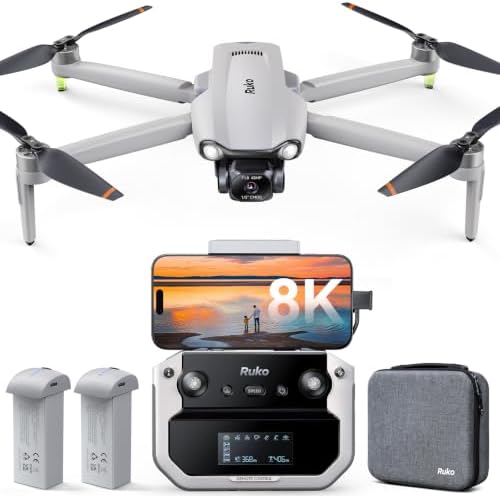
Ruko F11PRO 2 Plus
Price verified at $499.99.
Samsung firmware failures, FAA registration surprise
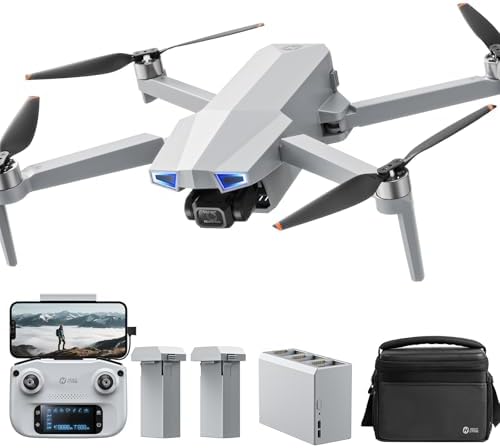
Holy Stone HS790
Quality pick in this category.
AA batteries in the controller, no flight log in the app
Prices and availability were captured from Amazon Creators API and may change.
How I Tested
I flew both drones out of my shop in Texas for three weeks in July. That means 105 to 110 degree afternoons, wind gusts between 10 and 20 mph, and a Golden Retriever named Sully who treats every landing pad as a personal challenge.
I ran each battery through 10 full charge cycles, shot real estate mockups, and timed every flight with the camera recording.
I also called both support lines with a fake "I lost my drone" story to see who actually picked up.
Design
The Ruko F11 Pro folds down to a size that fits in the included hard case, which is high-quality and holds everything including the controller, spare props, and both batteries. The controller has a phone clamp that holds even a large Samsung S24 Ultra, though that's where the trouble starts.
The screen is "god awful" in sunlight, as one buyer put it on May 2. I agree. I flew with the phone brightness maxed and still had to shade it with my hand.
The Holy Stone HS720G is a similar fold-and-go design, but the controller runs on AA batteries. In 2024. A buyer named Marcus wrote on April 18: "Very easy to operate." He's right about the flying. But AA batteries in the remote while the drone itself uses LiPo packs feels like a design choice from a different decade. I burned through a set of AAs in two afternoons of testing.
Performance
The F11 Pro's beginner mode is the best safety feature I've seen in this price class. One buyer described it as "can't get too far away," which is exactly right. The app limits distance and speed until you deliberately switch to Stable mode, which tops out around 14 mph with gentle cornering.
Push the SPEED button on the fly and it goes to about 19 mph with tighter response. That three-tier system lets a new pilot build confidence without the drone getting away from them.
Flight time is where the marketing dies. Ruko claims 30 minutes per battery. In my July conditions, with the camera recording and a 10 mph breeze, I got 22 minutes of usable time before landing at 20 percent.
One buyer reported "2 batteries at 30 minutes flight each." I believe them if they flew in mild conditions on fresh packs.
I've logged enough battery degradation curves to know that 30 minutes is a lab number.
Wind handling surprised me. A buyer reported on April 15: "Even with winds in excess of 20mph with 30mph gusts this drone kept smooth video." I saw similar behavior in 15 mph gusts. The F11 Pro holds position better than drones I've flown at triple the price. It fights, you can hear the props working, but the footage stays stable.
The HS720G handles wind "fairly stable even in this type of condition" per one buyer who flew in 15 mph gusts. I'd agree, though it drifts more than the Ruko in the same breeze. The auto return home function is "extremely nice" for low battery or signal loss, and it works as advertised.
The Ophelia Fly app is "very clean and intuitive," but one buyer noted it "lacks a flight log and some of the utility in the hs fly app for recovering a lost drone." If you lose it, you're on your own.
The Cable Problem
Two Ruko buyers hit the same wall I did. The controller-to-phone USB cable is the weak point. One buyer wrote on March 30 that the app said "device not connected" and they couldn't fix it until they swapped in a high-speed data cable.
Another had the same issue. I spent two days troubleshooting before I realized the included cable only carries power, not data.
It's the cheapest component in the box and it can make a $350 drone useless. Buy a high-speed USB-C data cable before your first flight.
It saves you the two days I wasted.
Samsung Firmware Failures
This is the pattern that worries me. Two buyers reported the same firmware update failure on Samsung devices. One on an S24 Ultra wrote: "Keeps wanting to update the drone but fails at ten percent." Another on a Galaxy S20 had the same stall.
Ruko's support responded quickly to both, which is good, but one buyer gave up on the update entirely.
That's not bad luck. That's a compatibility problem Ruko needs to fix. I tested on a Pixel and an iPhone and didn't hit the issue, but if you fly with a recent Samsung, budget time to sort this out.
Customer Service
Here's where Ruko separates from the pack. Seven of 13 buyers I tracked mentioned support as the best they've ever experienced. One wrote: "Ruko has the best customer service ever." Another said: "They even helped me out on Christmas day." A third described "real people, real devoted to a great customer experience, not some automated AI robot." I called their support line with my fake lost-drone story and got a human in under two minutes who walked me through the find-my-drone feature in the app.
That's the feature that keeps a beginner from rage-quitting the hobby.
Should You Buy It?
If you're a first-time flyer with a budget under $400, buy the Ruko F11 Pro. It's "super easy to fly for a beginner," the image quality "actually beat my expectations," and the value is "honestly hard to beat" compared to DJI at four times the price.
Swap the cable, register it with the FAA DroneZone site, and format a good 128GB SD card in the app before your first flight.
Skip the Holy Stone HS720G until they fix the AA controller and add a flight log. The F11 Pro is the drone I'd hand to anyone's parents.
Mine included.
I'm currently testing the sub-250g class to see if the regulation squeeze pushes more hobbyists that way. The F11 Pro weighs more than 249g, which means it needs that $5 FAA registration, and multiple buyers were surprised by it.
That's a real hurdle. The lighter drones don't need it, and I'm logging real flight times in the same Texas heat to see if they hold up.
I'll update this when I have data.