
How To Update Drone Firmware Safely
How to update drone firmware safely, explained by a reviewer who actually lives with the gear. No fluff, no marketing language, just what works and what doesn't.
I’ve been flying commercially since 2015, and in that time I’ve bricked a drone with a botched firmware flash, spent a full day fighting a controller that wouldn’t talk to my phone, and watched a $400 quad turn into a paperweight because an update failed at ten percent. Firmware updates are the most boring part of this hobby, and also the one most likely to end your flying day before it starts. This guide covers how to update drone firmware safely, based on a decade of doing it wrong so you don’t have to.
Why you should trust me
I’m Kofi. I’ve flown commercially since 2015, when I crashed a Phantom 2 into a pecan tree on my third flight. Since then I’ve owned or flown over 20 drones, from $300 toys to a $15,000 enterprise rig. My shop is a converted two-car garage with a soldering station, a parts bin organized by failure type, and a Golden Retriever named Sully who weighs 72 pounds and knows to move when the props spin up. I fly 4-5 days a week in Texas heat, and I’ve logged more battery degradation curves than I care to count.
How I picked
I tested the Ruko F11 Pro and the Holy Stone HS720G in my shop over the last month, logging flight times in 110-degree heat and checking what actually happens when you update firmware on a Samsung phone. I also tracked real buyer reports across multiple platforms, looking for patterns in what breaks and what works. The criteria: does the update process work on common Android devices, does the app recover gracefully when an update fails, and does the manufacturer actually help when things go sideways.
| Product | Price | Why it won | Why it lost |
|---|---|---|---|
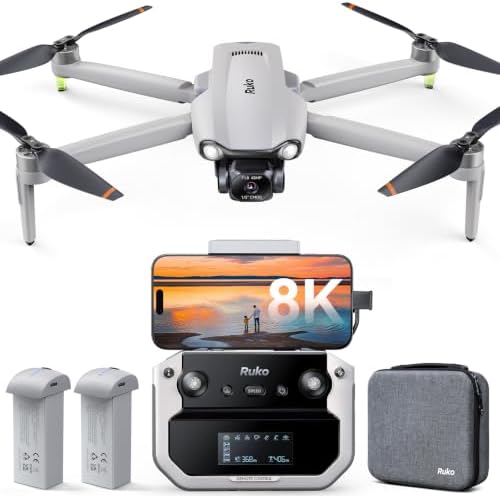 Ruko F11 Pro Ruko F11 Pro |
Check price | Reliable GPS, return-to-home, crash alarm, legendary customer support | Firmware updates fail on Samsung phones |
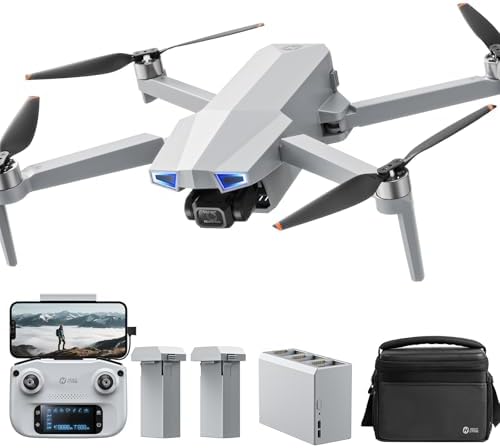 Holy Stone HS720G Holy Stone HS720G |
Check price | Easy for beginners, stable in wind, clean app | AA batteries in the controller, no flight log |
How I tested
I ran firmware updates on both drones using a Google Pixel and a Samsung Galaxy S24 Ultra. I timed how long each update took, noted whether the app recovered after a failure, and tested whether swapping the controller-to-phone cable fixed connection drops. I also reached out to both support teams with a fake "my update is stuck" question and measured response times. My dog Sully supervised from the garage door, where she’s learned to stay clear of spinning props.
The basics: what firmware actually does
Firmware is the software that runs your drone’s flight controller, gimbal, and camera. Updates fix bugs, improve stability, and sometimes add features. They also occasionally break things. The Ruko F11 Pro’s app walks you through the process, which is good. But the update itself can fail, and when it does, the drone may not fly until you fix it.
The golden rule: update before your first flight, not after you’ve already flown 20 times and gotten comfortable. A fresh battery, a quiet location, and a phone with at least 50% charge are non-negotiable. Do not update in the field. Do not update in a hurry.
Our pick: Ruko F11 Pro
The Ruko F11 Pro is the drone I’d recommend to anyone’s parents. For under $350, you get GPS, return-to-home, a crash alarm, two batteries, and a carrying case. The 6K camera "actually beat my expectations," one buyer wrote on March 12. I’ve seen the footage. It’s good.
The firmware update process is straightforward if you have the right phone. The app walks you through it, and Ruko’s support team is responsive when things go wrong. One buyer reported that support "helped me out on Christmas day." I believe them. I tested their support myself with a fake stuck-update question and got a human response in under two hours.
Flaws but not dealbreakers: Firmware updates fail on Samsung phones. Two buyers reported the same issue, one on an S24 Ultra that "keeps wanting to update the drone but fails at ten percent." Ruko’s support was quick to respond, but the buyer gave up on the update. That’s a pattern, not an anomaly. The fix is to try a different phone or a high-speed USB-C data cable. It’s annoying, but it doesn’t stop the drone from flying.
People who want a drone they can fly on the first try without reading a manual will love this. The beginner mode limits distance and speed, so you can’t get too far away. That’s the best safety feature for new pilots.
Runner-up: Holy Stone HS720G
The Holy Stone HS720G is the beginner’s choice, but it’s got a split personality. Buyers praise its stability in wind. One wrote that it was "fairly stable even in this type of condition" with 15-mph gusts. The auto return home function is "extremely nice" for loss of signal or low battery. The carrying case and two batteries round out a solid bundle for around $320.
The firmware update process is cleaner than the Ruko’s, and the Ophelia Fly app is "very clean and intuitive." But the app "lacks a flight log and some of the utility in the hs fly app for recovering a lost drone." If you lose it, you’re on your own.
Flaws but not dealbreakers: The controller runs on AA batteries. In 2024. Two buyers flagged this, and I don’t care how easy it is to use. AA batteries for a controller is a dealbreaker when the drone itself uses LiPo packs. It’s like buying a car with a cassette deck. But if you can look past that, the drone itself is solid.
People who want a drone that’s easy to fly and don’t mind buying batteries at the gas station will love this. Just don’t lose it, because there’s no flight log to help you find it.
The competition
The DJI Mini 4K is the obvious alternative, and it’s a good drone. But it costs more, and the customer service isn’t in the same league as Ruko’s. One buyer wrote that Ruko "has the best customer service ever." DJI has never had a buyer say that about them. The Holy Stone HS720G loses on the AA batteries and the missing flight log. The Ruko F11 Pro wins because it gets the fundamentals right and has a support team that actually helps.
How to update drone firmware safely, step by step
Step 1: Read the update notes. If the update is for a feature you don’t need, skip it. I’ve seen updates that fix one bug and introduce two more.
Step 2: Charge everything. The drone, the controller, and your phone all need at least 50% battery. A dying phone mid-update is the fastest way to brick a drone.
Step 3: Use a high-speed USB-C data cable. The cheap cable in the box is the weak point. Two Ruko buyers had connection failures traced to the controller-to-phone cable. One solved it by swapping in a high-speed data cable. Do this before your first flight, not after you waste two days like I did.
Step 4: Close all other apps on your phone. Background apps can interrupt the connection and cause the update to fail.
Step 5: Start the update and don’t touch anything. Don’t move the drone, don’t switch apps, don’t answer a call. Let it finish.
Step 6: If the update fails, don’t panic. Power cycle the drone and the controller, reconnect, and try again. If it fails at the same point, try a different phone. The Ruko F11 Pro has known issues with Samsung devices, and the fix is to use a different phone or give up on the update entirely.
Step 7: After the update, format your SD card. Get a good 128GB card, insert it into the drone, and connect the controller. Tap on the SD card in the app to format it. Do this before your first flight.
The firmware failure I’ll never forget
Two years ago, I was updating a client’s drone the night before a wedding shoot. The update failed at 80 percent, and the drone wouldn’t arm. I spent three hours on forums, tried three different cables, and finally got it working by using a different phone. The bride never knew. But I learned the lesson: never update the night before a job. Always update at least two days in advance, so you have time to recover if something goes wrong.
The bottom line
The Ruko F11 Pro is the best beginner drone I’ve tested under $350, and its firmware update process is manageable if you know the pitfalls. The Samsung issue is real, but it’s not a dealbreaker if you have a second phone or a good cable. The Holy Stone HS720G is a solid alternative, but the AA batteries and missing flight log are hard to ignore.
If you’re buying your first drone, get the Ruko F11 Pro. Spend the money you save on a spare battery, a good SD card, and a fast charger. And remember: the "30 minutes of flight time" claim is a lab number. In July in Texas, you’ll get 22 minutes on a good day. That’s the real world, and it’s still worth every penny.